

ai-plugin#dsh-plugin
aipx 工具包:技能之外还有 Hub Console 控制台——用约 4 个元工具代理全部 MCP 服务器,含服务器池健康、工具级启停、工具目录,以及直观展示 mcp_search 返回结果的搜索试验场。
 README
ai-plugin
Skills into the shared standard root every major harness reads — plus an MCP hub that fronts every server with ~4 meta tools, and a console to manage it all.
Claude Code · DeepSeek Harness (dsh) · Codex CLI · Gemini CLI · GitHub Copilot · Cursor · OpenClaw
English | 简体中文
Your machine runs 4 different AI agents. Your favorite skill exists as a
GitHub repo. Now what? Copy folders into ~/.claude/skills, then
~/.agents/skills, then ~/.gemini/skills, then ~/.copilot/skills… and
re-do it after every upstream update. And once every agent has twenty MCP
servers wired up, their tool definitions eat your context window alive.
aipx fixes both. One command installs a skill into the shared standard
root (~/.agents/skills — read natively by dsh and Codex, linkable by the
rest). And the aipx MCP hub fronts ALL your MCP servers with 4 meta
tools — search, call, status, refresh — so the model sees one server instead
of fifty. The bundled skills teach you (and your agents) how to publish for
every harness from a single repo.
▼bash复制代码npx github:zhangliang0115/ai-plugin install <owner>/<repo>
Why
Every agent harness converged on the same skill format — SKILL.md — but
not on the same install location:
| Agent | Reads skills from |
|---|---|
DeepSeek Harness (dsh) | ~/.agents/skills/ + <project>/.agents/skills/ |
| Codex CLI | ~/.agents/skills/ + <project>/.agents/skills/ |
| Claude Code | ~/.claude/skills/ + <project>/.claude/skills/ |
| Gemini CLI | ~/.gemini/skills/ + <project>/.gemini/skills/ |
| GitHub Copilot CLI | ~/.copilot/skills/ + <project>/.github/skills/ |
| Cursor / OpenCode / OpenClaw | their own roots (full matrix) |
Plugins fragment even further: Claude Code wants
/plugin marketplace add, dsh wants
dsh plugin --profile web add "github:o/r#path:/dsh-plugin", Gemini wants
gemini extensions. aipx is the missing common denominator: one installer,
one registry, one list, for all of them.
Commands
▼bash复制代码aipx install owner/repo                          # repo root or skills/ auto-detected
aipx install owner/repo#path:/skills/their-skill # subdirectory (same syntax as dsh)
aipx install https://github.com/owner/repo/tree/v1.2/skills/x   # pinned ref
aipx install ./my-skill                          # local directory
aipx install owner/mcp-server                    # .mcp.json repos add MCP servers too
aipx install owner/repo --project                # project-scoped: .claude/skills,
                                                 # .agents/skills, .github/skills, …
                                                 # committed with the repo for the team

aipx upgrade         # re-install recorded skills from their source (--force semantics)
aipx list            # what's installed, per agent
aipx search deepseek # curated registry; add --github for live GitHub topics
aipx lint skills     # validate SKILL.md quality (frontmatter, triggers, links, nesting)
aipx new my-skill    # scaffold a publish-ready dual-target skill repo
aipx collection                    # browse curated capability bundles
aipx collection deepseek-coding --run   # install a whole stack in one go
aipx mcp list        # inventory MCP servers across every agent's config
aipx mcp import      # register discovered MCP servers into the aipx hub
aipx mcp add fs -- npx -y @modelcontextprotocol/server-filesystem /tmp   # register one more
aipx mcp serve       # run the hub: one MCP server, 4 meta tools, zero context bloat
aipx remove <name>   # uninstall everywhere
aipx doctor          # environment + agent detection + version check
Example:
▼console复制代码$ aipx install JimmyLv/bibigpt-skill#path:/skills/bibi
✔ detected skill with 1 skill(s):
    bibi — Summarize YouTube, Bilibili videos and podcasts…
✔ target roots:
    ~/.agents/skills (Shared skills root — read natively by dsh & Codex)
✔ installed bibi into shared root ~/.agents/skills
MCP hub — every server, ~4 tools, one context
Every downstream MCP server dumps its full tool catalog into your context. With 20 servers × 10 tools that's tens of thousands of tokens of tool definitions the model must wade through on every turn.
The aipx hub flips it: one MCP server (the hub) fronts all of them and
exposes ~4 meta tools. The model searches for a capability, gets the
matching tool's inputSchema back, then calls it — loading only what it
uses.
▼bash复制代码aipx mcp import        # pull every MCP server found in your agent configs
aipx mcp add fs -- npx -y @modelcontextprotocol/server-filesystem /tmp   # register one more
aipx mcp serve         # speak MCP over stdio; wire this into any agent:
#   { "mcpServers": { "aipx": { "command": "aipx", "args": ["mcp", "serve"] } } }
| Meta tool | Purpose |
|---|---|
mcp_search | keyword-search every downstream tool; returns id + description + inputSchema |
mcp_call | execute a downstream tool by server/tool id from mcp_search |
mcp_status | registered servers, tool counts, health |
mcp_refresh | re-scan servers after you add or remove one |
Downstream servers are spawned on demand and reused. Both transports are supported — local stdio and remote streamable-HTTP servers — and search runs through a pluggable index with four engines, picked automatically: a zero-dep lexical scorer; zvec full-text (BM25-style, Chinese-aware); a zero-config hybrid that fuses full-text with a free local embedding model (~220 MB, auto-installed and auto-downloaded on first build — no API key); and a remote-embeddings hybrid for teams that already run one. On the bundled 20-query eval, hybrid ranks 14/20 top-1 vs 8/20 lexical — Chinese phrasings go 0/10 → 9/10. Docs: MCP hub guide · search engines + eval.
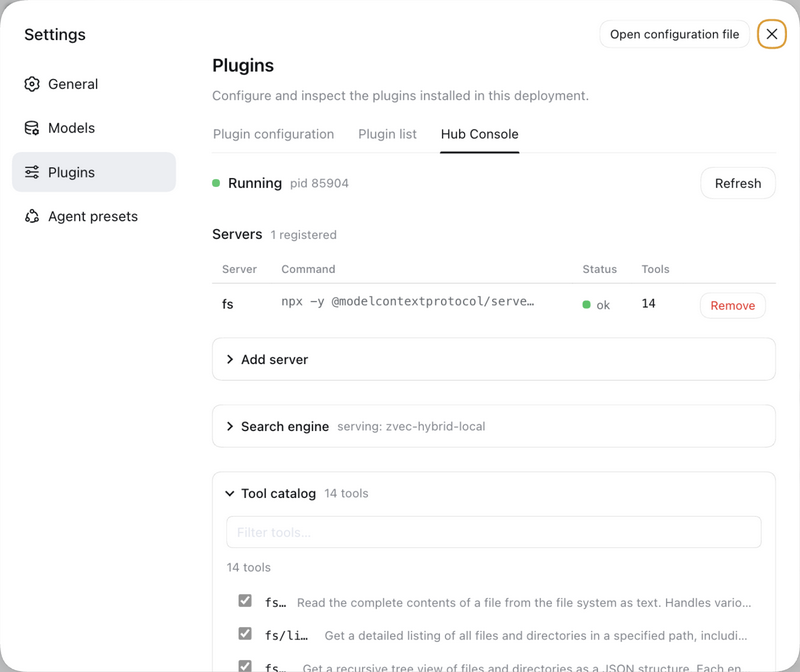
Hub console — manage the hub from dsh's settings
In DeepSeek Harness, the bundle adds a Hub Console tab under Settings →
Plugins: the server pool with live health, add/remove servers, per-tool
enable/disable (disabled tools leave the model-visible catalog), the tool
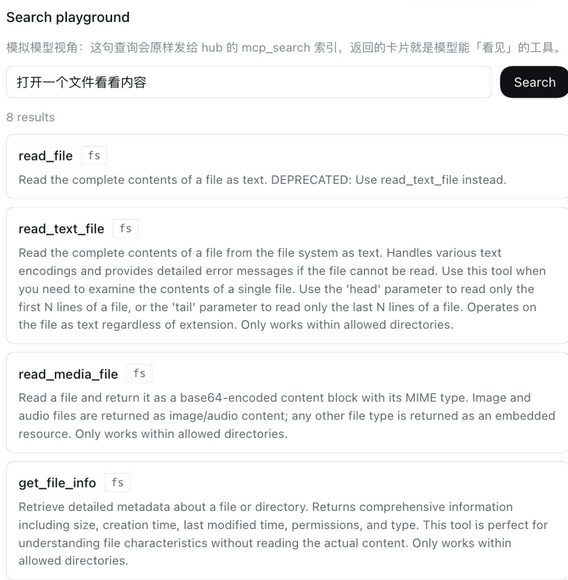
catalog with filtering, and a search playground that shows exactly what
mcp_search would hand the model — type 中文, see which tools surface.
Tui profiles skip the console; skills work everywhere.
What's bundled (the toolkit)
This repo is itself a plugin payload — use it three ways:
▼bash复制代码# 1. Plain skills, every agent:
aipx install zhangliang0115/ai-plugin

# 2. Claude Code marketplace:
#    /plugin marketplace add zhangliang0115/ai-plugin
#    /plugin install ai-plugin-toolkit@ai-plugin

# 3. DeepSeek Harness bundle:
dsh plugin --profile web add "github:zhangliang0115/ai-plugin#path:/dsh-plugin"
| Skill | Teaches your agent to |
|---|---|
skill-author | write SKILL.md skills that load in every harness — incl. the tier-shadowing and discovery gotchas generic guides miss |
skill-portability-audit | audit "works in Claude but not in dsh" failures: collisions, shadowing, trigger quality, per-agent smoke matrix |
dsh-plugin-dev | package & publish DeepSeek Harness bundles (cordis.patch.yml, ctx.skills.register, the git-install gotchas) |
claude-plugin-dev | publish Claude Code plugins & marketplaces with the dual-target pattern (one repo → every agent) |
deepseek-cost-router | route work between deepseek-chat / deepseek-reasoner to cut API cost |
deepseek-migration | migrate an agent setup from OpenAI/Anthropic to DeepSeek — caching, tool-calling, cost levers, dsh option |
Design principles
- Zero dependencies. One JS file per concern,
node:testsuite, no supply-chain surface. - Non-destructive. Installs skip existing targets unless
--force;--dry-runpreviews; removal goes through a manifest. - One canonical root.
~/.agents/skillsis the shared standard (read natively by dsh and Codex) — install writes one copy there and nothing else. No duplicate trees, no drift. - Context-first MCP. The hub fronts every downstream MCP server with a handful of meta tools; the model searches and calls on demand instead of loading every tool definition into context.
Docs
- Compatibility matrix — every root, every tier
- Install into DeepSeek Harness (dsh) — researched guide: skill roots, tiers, bundle format, gotchas
- Install into Claude Code — marketplaces & plugins
- MCP config sync — 简体中文版:docs/mcp-sync.zh-CN.md
- Publish once, target every agent — the dual-target repo layout
- Quick actions in dsh — dsh-native custom prompts and what we deliberately don't rebuild
- MCP ecosystem — use/reference/build decisions for MCP managers
- Troubleshooting — common failures and fixes
Requirements
Node.js ≥ 20 and tar (built into macOS, Linux, Windows 10+). No npm install
step — npx github:zhangliang0115/ai-plugin runs straight from the repo, or install globally with npm i -g @zhangliang0115/aipx.
Optional: GITHUB_TOKEN for higher API rate limits.
Roadmap
- v0.1 — install / list / search / remove / doctor
- v0.2 — project-scope installs,
aipx newscaffolder,aipx upgrade, lint - v0.3 — MCP server config sync, registry validation bot + website + install smoke
- v0.4 — MCP hub (
mcp import/mcp add/mcp serve), skills toolkit (6 skills) - next — vector search contract + pluggable sidecar index, registry collections (
aipx collection) - then — zvec sidecar wiring (Python), npm registry publish, registry expansion
See ROADMAP.md and CHANGELOG.md.
Contributing
PRs welcome — especially new curated registry entries and community-tier root confirmations. See CONTRIBUTING.md and the plugin submission template.
License
MIT © 2026 zhangliang0115


